Chasing Zero Downtime with Rolling Deployments
8/23/2024
If you're deploying many times a day, you don't want your application to go down every time. Let's explore how you can avoid downtime with rolling deployments.

When maintaining a web application, uptime is king. You want to make sure that as many requests as possible are handled without error. At the same time, you want to be able to get new versions of your application out the door frequently.
If you turn off the old version before starting the new one, there will be a short period of time when user requests stall or completely fail. Worse, if the new version doesn’t come up successfully, you could have even more downtime!
You probably don’t want to declare a maintenance window whenever you have new code to ship, so how can you avoid your application going down every time you upgrade it? Pretty much any solution will involve having the old and new versions running at the same time. We previously discussed blue-green deployment, which would be a perfectly viable solution to this problem, but by far the most common approach is the rolling deployment.
How Rolling Deployments Work
At it’s core, rolling deployment is a process where multiple instances of an application are upgraded one at a time, ensuring there are always instances of the old, new or both versions available.
As an example, let’s imagine an application with two instances. Both of them are currently running version 1. The instances sit behind a load balancer so user requests are spread evenly between them.
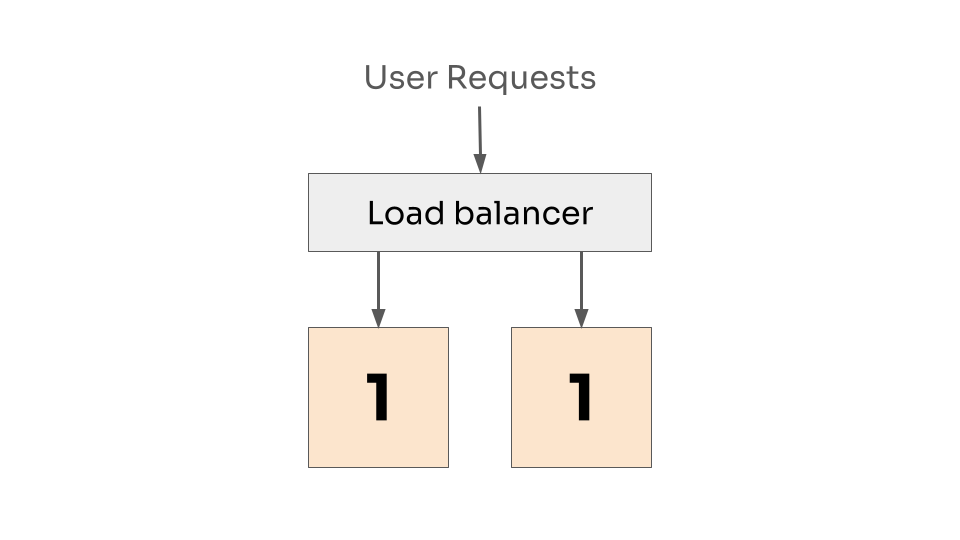 Two instances at version 1, with requests load balanced between them.
We want to release version 2, and we’re going to do this one instance at a time. So first, we take down the first instance and remove it from the load balancer. The second instance continues to handle requests and picks up the slack.
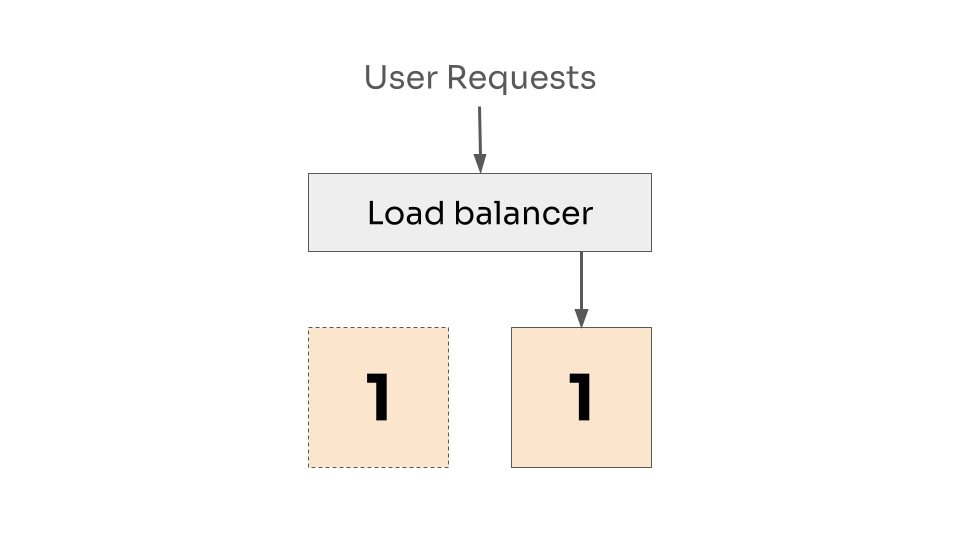 One instance down, and removed from the load balancer.
Now we replace the first instance with version 2. Which will take a moment to start, so it will not immediately be taking requests.
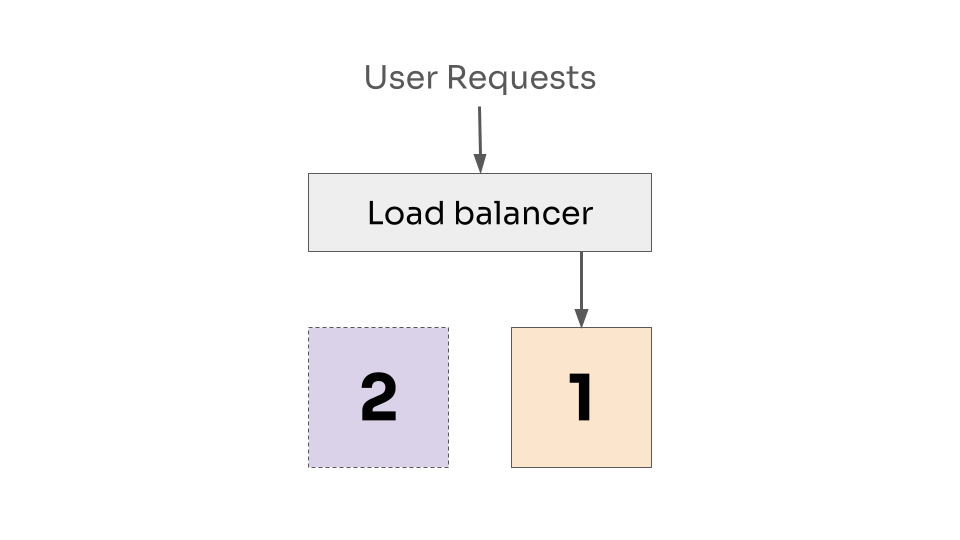 First instance is now at version 2, but is not ready to receive requests.
Once the new instance has started, it can now be handled by the load balancer.
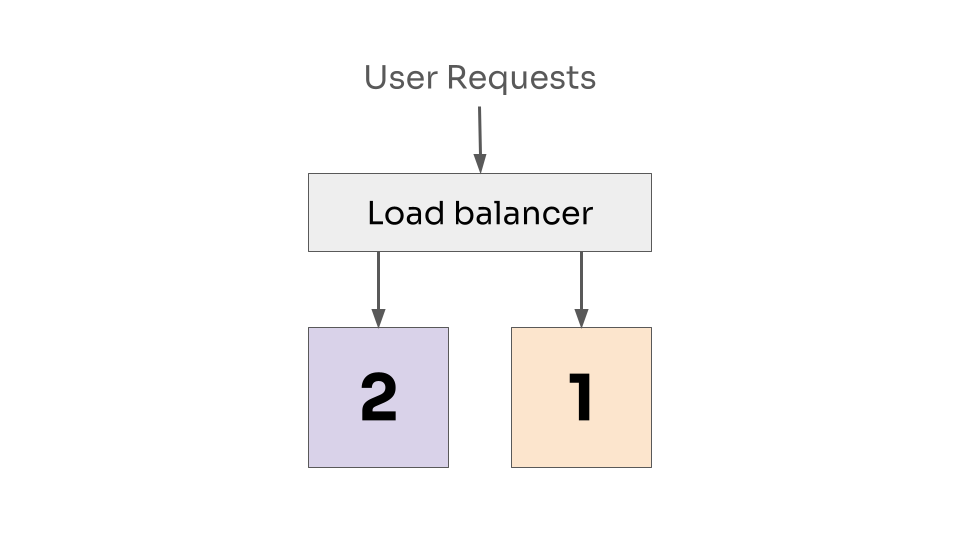 First instance is accepting requests at version 2, and the second instance is still accepting requests at version 1.
We now repeat the process for the second instance.
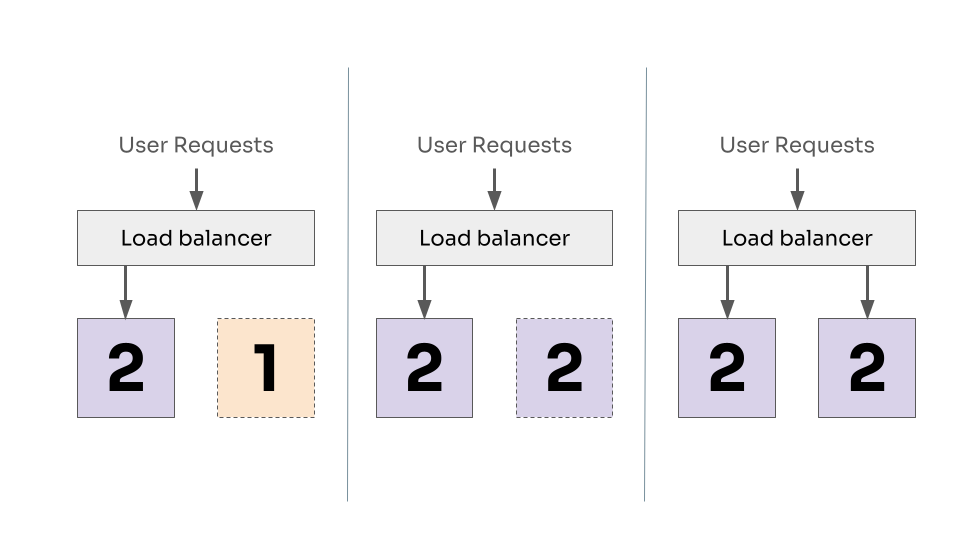 Repeating for the second instance. Taking it down, updating to version 2 and adding back to the loadbalancer.
This way, we always have at least one instance ready to serve requests, notice how in every diagram there was always a connection from user request to at least one working instance of our application.
This approach typically requires that you have multiple instances of your application - but in most cases having multiple instances is desirable for general availability reasons. In fact, three instances is a typical minimum so you can lose one and still have some kind of protection.
This process can be tweaked in a number of ways, depending on your needs. You may want to add an extra instance during the rollout, so you don’t reduce your capacity. If you have a lot of instances, you may also want to batch them into groups.
Support
Rolling deployment is such a common strategy that pretty much all popular orchestration tools provide out-of-the-box support.
Kubernetes defines rolling deployment via the strategy in the Deployment API, and provides a number of configuration options to define how many instances you can tolerate being down at once.
Hashicorp’s Nomad provides support with similar levels of control via the job update block, allowing you to configure how many instances to update at once, how long to wait for them to be up, and even what to do when something goes wrong.
Even when you’re working in the serverless world, where the downtime concern is less of an issue, it can be desirable to slowly roll out a change. Similar to the canary or blue-green models, you may want to transfer traffic over to a new version slowly to catch problems quickly. Both AWS Lambda and GCP Cloud Run have their own form of rolling deployments.
Drawbacks
As with any practice, rolling deployments are not without their challenges and won’t always be the correct choice for every use case.
Architecture requirements
Rolling deployments require that you both have multiple instances of your application, and that requests can be effectively load balanced between them. At a minimum this means that your application must be stateless and horizontally scalable. This isn’t always possible or desirable.
Maybe you have a service that processes batch jobs from a queue and everything must be processed in-order. In this scenario, it’s easiest and safest to just have one instance. Fortunately, any downtime in upgrading this one instance will only result in a slight delay in processing jobs, which may not really be a problem. Then all you need to worry about is retrying jobs that were interrupted.
Slower deploys
Repeating the same deployment steps multiple times can make deployments take a long time. Multiply a large number of instances with multiple environments (staging, production, etc), your engineers could be waiting around for quite a while before their change gets out to users. Any delay here can increate the risk that problems will manifest in production after everyone’s gone home.
You can mitigate this by batching updates, or if you’re ok with having more instances, you can go full blue-green. But the first place to look should always be how long your application takes to start, maybe you have a startup process that has to populate a large cache (I once saw a program that took multiple minutes to start for this reason), or a complex handshake with downstream services. If you can shave even a second off of the startup time, you’ll not only improve your deployment process, but also make the developer experience better when running locally.
Multiple versions running at once
While the rolling update progresses, you will also be running two versions of your software at the same time. If those two versions don’t play well together, you could end up with strange behavior, or worse, corruption of your data.
This requires defensive coding to ensure that both versions will still work with the same versions of upstream and downstream APIs and storage (remember the backwards compatible schema changes?).
Conclusion
Rolling deployment is a well-support strategy to ensure you always have a working copy of your application running to serve your users. It requires a little care in your architectural design and how you structure your changes, but can mean the difference between a smooth experience and frequent, short outages.