Can you use GitHub Actions for Monitoring?
9/20/2024
Short answer: you could, but you really, really shouldn’t.
This is a repost of an article I wrote on Medium in 2020, with a couple of updates from improved documentation and discussion with colleagues.
I’ve long been a fan of GitHub Actions, I’ve found it to be remarkably powerful, providing pretty much all the features you’ll need when you’re starting out, and with a generous free tier, particularly for open source repos.
While working through the workflow trigger docs, I noticed that you could set up a job with a cron schedule that triggers every 5 minutes. This was incidentally the same frequency offered by free for a few monitoring tools I explored. This got me wondering if it was possible to use Actions for monitoring a website’s uptime.
In theory, you could create a Workflow that was triggered every 5 minutes and hit a URL with curl, failing the job if the request failed or returned an invalid status code. Downtime would then be represented as a failing test, with e-mail notifications built right into the platform.
But would this be a reasonable substitute for a dedicated, for-purpose monitoring solution?
The first concern that came to mind was the reliability of Actions. If builds failed for spurious reasons, you might stop paying attention when got a real failure notification. Related to this was the latency between jobs. If you wanted a job to run every 5 minutes, would it actually be running every 5 minutes?
An experiment
To test this reliability, I set up a repo with a workflow that recorded the epoch time to a file every 5 minutes.
The workflow yaml looked something like this:
name: 'Scheduled'
on:
  schedule:
    - cron:  '*/5 * * * *'
jobs:
  scheduled:
    name: Scheduled Job
    runs-on: ubuntu-latest
    steps:
      - name: 'Checkout'
        uses: actions/checkout@master
        with:
          fetch-depth: 1
      - name: 'Checkout runs branch'
        uses: actions/checkout@master
        with:
          ref: runs
          path: runs
      - name: Update record of runs
        run: date +%s >> runs/times.txt
      - name: Commit
        run: |
            cd runs
            git config --global user.email "[email protected]"
            git config --global user.name "GitHub Action"
            git add -A
            git commit -m "Record job run"
      - name: Push changes
        uses: ad-m/github-push-action@master
        with:
          branch: runs
          github_token: ${{ secrets.GITHUB_TOKEN }}
          directory: runs
I left this running for 11 days (I had planned on just 7, but got distracted). During this time there were 2150 runs of the workflow, and 2147 times recorded.
Results and theories
There were three spurious failures, only one of which corresponded to an Actions incident on the GitHub Status page. This is about a 99.87% success rate, pretty decent.
Downloading the list of recorded times, and dropping them into a spreadsheet, a plot of the duration between recorded runs showed something surprising.
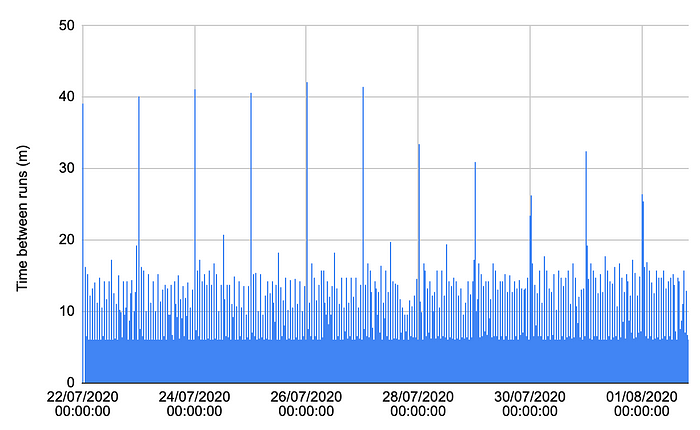 Chart of times between action runs over 11 days
The majority of runs were separated by a little over 5 minutes, as expected, but a decent number were delayed up to 20 minutes, with regular spikes of over 40 minutes. All in all, less than 20% of runs were started within 6 minutes of the previous one, and only 88% started within 10 minutes.
The 40 minute spikes all seemed to occur at midnight UTC, which suggests to me that there is some kind of maintenance task being performed at this time that will delay new jobs from running.
Update: Since the time of writing, the GitHub documentation has added a couple of points that suggest another reason for these spikes.
The
scheduleevent can be delayed during periods of high loads of GitHub Actions workflow runs. High load times include the start of every hour. If the load is sufficiently high enough, some queued jobs may be dropped. To decrease the chance of delay, schedule your workflow to run at a different time of the hour.
Based on this, I imagine that a lot of teams are scheduling a task to run outside of business hours, and midnight is the most obvious time to run it.
Why you shouldn’t use it
Irregular sampling and predictable 40 minute windows without any monitoring at all is certainly not going to give confidence in your uptime metrics. And it’s kind of unreasonable to expect otherwise, since Actions wasn’t designed for this. When you’re running CI, these kinds of delays are annoying, but acceptable, especially when you’re getting it super cheap, if not free, and sharing resources with countless other developers.
But just in case you’re thinking of some clever ways to work around this, perhaps with long-running jobs and complex leader-election mechanisms to hand over control from one job to another, there are some other, more obvious drawbacks.
Using Actions in this way degrades your experience in the GitHub UI, clogging your activity feed with mention of every time the workflow updates its records:
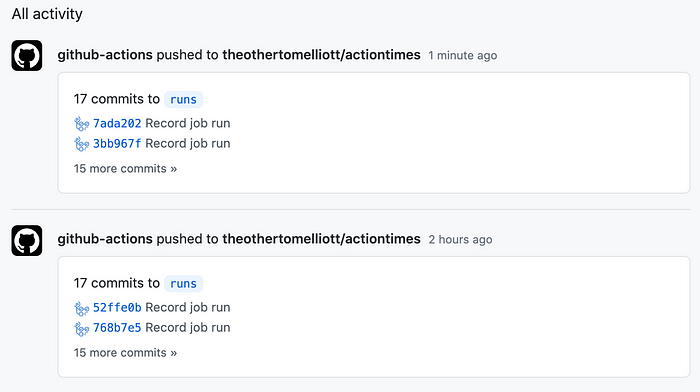 My GitHub activity log filled up with references to Actions commits
Update: Since the original post, GitHub has introduced a restriction on long-lived scheduled workflows.
In a public repository, scheduled workflows are automatically disabled when no repository activity has occurred in 60 days. For information on re-enabling a disabled workflow, see “Disabling and enabling a workflow.”
This means that you would need to continuously make updates to your repo to allow the cron job to continue running. Which, as anyone who’s been on the hook to rotate certificates can say, is very easy to forget.
Finally, and crucially, it’s very likely against the terms of service.
Actions should not be used for:
…
serverless computing;
…
any other activity unrelated to the production, testing, deployment, or publication of the software project associated with the repository where GitHub Actions are used.
It could be argued that monitoring is considered “production” or “testing”, but I wouldn’t want to risk having my monitoring discontinued, in worst case with zero notice.
GitHub Actions is a CI tool. And a pretty good CI tool at that. If you’re thinking of using it for any use cases other than CI, you should probably stop and look for purpose-built alternatives or if you’re feeling daring, build something from the ground up.
What I’d recommend instead
Update: Since I wrote this article, I discovered Checkly, a synthetic monitoring solution that goes way beyond the simple curl I outlined above. In my last role we were using them for 4 years and the service supercharged our ability to get in front of outages before our customers noticed.
 Screenshot from the Checkly site showcasing their integrations
The Checkly team are also great to work with, super fast with support, and even helped us discover technologies like Playwright to level up our testing game as a whole. If you’re in the market for synthetic monitoring (or monitoring-as-code) they’re well worth a look.