Can Git back a REST API? (Part 2 - git protocols)
12/12/2025
Running a REST API off of the Git CLI tool was slow to say the least. Can I make the API a little faster by interacting with the Git server more directly?

In part 1, I set up a very naïve Git-backed REST API, using the git cli tool. I showed it could maybe, possibly be used to handle storage, but that it was also painfully slow.
In this edition, I’m going to use go-git to interact more directly with the underlying Git protocols. I’ve been using go-git for a while now on a few different projects, and it provides some really nice ways to interact with git plumbing and even provides porcelain-like functions. It even allows you to store data in-memory! But for this project, I’ll be diving deeper than even the porcelain and working with the underlying protocols.
Git supports a number of protocols for interacting with a remote server. These include local (for interacting with the filesystem), http, ssh and git. For day-to-day developer work, you’ve probably worked with the ssh or http protocols most, with commands like: git clone https://github.com/theothertomelliott-test/test-repo.git.
I’m going to be focusing on the http protocol, since it supports token-based authentication, which is a little easier to manage on a server than ssh keys. To be specific, I’ll use the “Smart HTTP” protocol, since “Dumb HTTP” is both less optimized and less widely supported.
Hopefully, by taking fine-grained control over what is loaded and when, I’ll be able to make my API a lot more performant.
Connecting
Before I can do anything with the Git protocols, I need to establish a connection. This takes a few steps with go-git, but the reasons behind that became apparent with a little usage.
Note: For brevity, all basic error handling is omitted in my snippets.
// Example ssh endpoint for a GitHub repo
endpoint := "https://github.com/theothertomelliott-test/test-repo.git"

// Set up a transport for this endpoint
ep, err := transport.NewEndpoint(endpoint)
t, err := transport.Get(ep.Scheme)

// Keep objects in memory
store := memory.NewStorage()

auth := http.BasicAuth{
    Username: “git”,
    Password: githubToken,
}
// Establish a session (auth is nil to use default ssh keys)
sess, err := t.NewSession(store, ep, auth)

// Separate handshakes are needed for reading and writing
// note the slightly confusing transport service names
readConn, err := sess.Handshake(ctx, transport.UploadPackService, "")
writeConn, err := sess.Handshake(ctx, transport.ReceivePackService, "")
The key pieces I’ll be working with are store, readConn and writeConn. To simplify the initial implementation, I focused first on the GET and POST operations I used for comparisons in part 1. So let’s look at reading and writing!
Reading
Step 1: Get current hash
func (b *Backend) getBranchHash(
        ctx context.Context,
        conn transport.Connection,
        branch string, // e.g.: "refs/heads/main"
    ) (plumbing.Hash, error) {

    refs, err := conn.GetRemoteRefs(ctx)

    for _, ref := range refs {
        if ref.Name().IsBranch() && ref.Name().String() == branch {
            return ref.Hash()
        }
    }

    return plumbing.ZeroHash, nil
}
Similar to the git pull calls in part 1, I need to make sure all reads start from the current HEAD of the branch as stored in the remote.
The connection has a function, GetRemoteRefs that can help with this. This function gets all of the available refs (tags and branches) and returns them along with their current hash. So I just need to search in the output for the right branch and return that hash.
This is where we get into the fun parts of git internals. Pretty much everything is represented by a hash. Commits, trees (state for directories) and blobs (file contents) all have a SHA-1 hash as identifier. For a more detailed overview, the folks at Graphite wrote a great guide: Understanding Git commit SHAs.
Useful as GetRemoteRefs is, it presents a problem. Aside from being all or nothing, there’s this note from the godoc:
Using protocol v0 or v1, this returns the references advertised by the remote during the handshake. Using protocol v2, this runs the ls-refs command on the remote.
At the time of writing, go-git doesn’t support v2 (see here), so I need to execute a handshake for every operation. Thankfully, the session can be reused, which should save a little time, but there is the chance this won’t give the performance boost I was hoping.
Step 2: Get the directory structure
Now I have the hash for the commit, I need to extract the contents to find the correct object. This can be done recursively with a fetch request, and using filters, this can be limited to only commit and tree hashes, so it won’t pull the contents of any of the files.
func (b *Backend) fetchTree(ctx context.Context, conn transport.Connection, hash plumbing.Hash) (*object.Tree, error) {
    // Create a fetch request that limits blob size to 0
    // this will just pull the directory structure
    fetchReq := &transport.FetchRequest{
      Wants: []plumbing.Hash{hash},
    }
    if conn.Capabilities().Supports(capability.Filter) {
        fetchReq.Filter = packp.FilterBlobLimit(
            0,
            packp.BlobLimitPrefixNone,
        )
    }

    err := conn.Fetch(ctx, fetchReq)

    // Decode the commit to read its content
    commit, err := b.store.EncodedObject(plumbing.CommitObject, hash)
    commitDecoded, err := object.DecodeCommit(b.store, commit)

    // Get the tree object from the commit
    treeHash := commitDecoded.TreeHash
    treeObj, err := b.store.EncodedObject(plumbing.TreeObject, treeHash)
    tree, err := object.DecodeTree(b.store, treeObj)

    return tree, nil
}
Step 3: Load the object
Once I have a tree, I need to search through it for the object at the target path, then load the object from its hash and decode it. I be getting the object from the in-memory store, and have to account for it potentially already being there.
func (b *Backend) getObjectAtPath(tree *object.Tree, path string) plumbing.Hash {
    for _, entry := range tree.Entries {
        if entry.Mode.IsFile() && entry.Name == path {
            return entry.Hash
        }
    }
    return plumbing.ZeroHash
}

func (b *Backend) getObjectByHash(
        ctx context.Context,
        conn transport.Connection,
        hash plumbing.Hash,
    ) (plumbing.EncodedObject, error) {

    // Attempt to load the object from storage
    // If it's not cached, this will return ErrObjectNotFound
    // and we can proceed to fetch it.
    blob, err := b.store.EncodedObject(plumbing.BlobObject, hash)
    if err == nil {
        return blob, nil
    }
    if err != plumbing.ErrObjectNotFound {
        return nil, fmt.Errorf(”getting blob object: %w”, err)
    }

    err = conn.Fetch(ctx, &transport.FetchRequest{
        Wants: []plumbing.Hash{hash},
    })

    // Try to get it again after fetching
    blob, err = b.store.EncodedObject(plumbing.BlobObject, hash)
    return blob, nil
}

func (b *Backend) readBlob(blob plumbing.EncodedObject) ([]byte, error) {
    reader, err := blob.Reader()
    defer reader.Close()

    content, err := io.ReadAll(reader)
    return content, nil
}
Putting it together
This all results in a GET function of the form:
func (b *Backend) GET(ctx context.Context, path string) ([]byte, error) {
    conn, err := b.getReadConnection(ctx)
    refHash, err := b.getMainHash(ctx, conn)
    tree, err := b.fetchTree(ctx, conn, refHash)

    objectHash := b.getObjectAtPath(tree, path)
    if objectHash == plumbing.ZeroHash {
        return nil, nil
    }

    blob, err := b.getObjectByHash(ctx, conn, objectHash)
    if err != nil {
        return nil, err
    }

    return b.readBlob(blob)
}
A pretty involved process for the equivalent of a git pull, but much less disk-intensive, and hopefully, a lot faster!
Writing
Writing to the repo is even more involved! I’ll spare you the finer details of the code, since it’s all available in api.go in the public repo.
Suffice to say, the process for a POST involves:
-
Handshake for fresh refs
-
Getting the current commit hash and tree
-
Checking the object doesn’t exist (error out if it does)
-
Storing a new object and getting the hash
-
Adding the hash to the existing tree
-
Creating a commit with the new tree
-
Creating a packfile by walking the new commit
-
Issuing a push request from the packfile
A lot of steps, but only 1 and 8 involve network calls. So let’s look at how it compares to the previous performance.
How does it compare?
As before, I ran a test involving a couple of GET and POST calls and saved a trace:
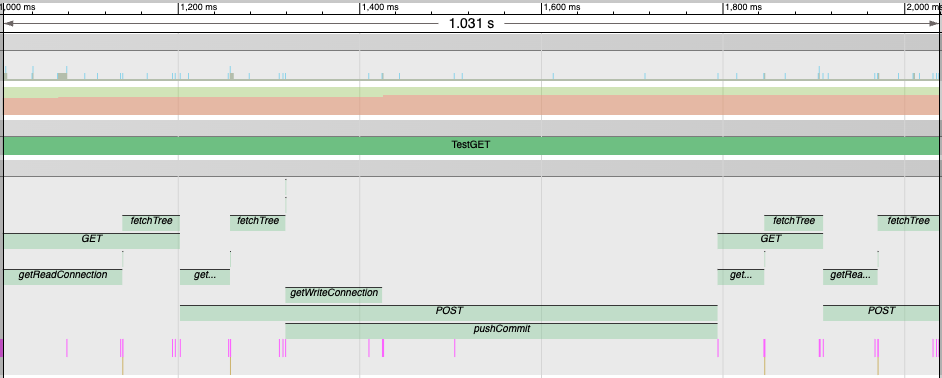 A trace segment including GET and POST operations using Git protocols
Believe it or not, this was slightly faster than the S3 example, with the initial GET coming in under 200ms for both the read and fetch.
What’s really interesting is that the first calls to getReadConnection and getWriteConnection took about twice as long as subsequent ones. This got me wondering if I could “warm up” the session to make all these calls faster. So I added a throwaway call to set up both the read and write connections when establishing the initial session (which wasn’t part of the trace).
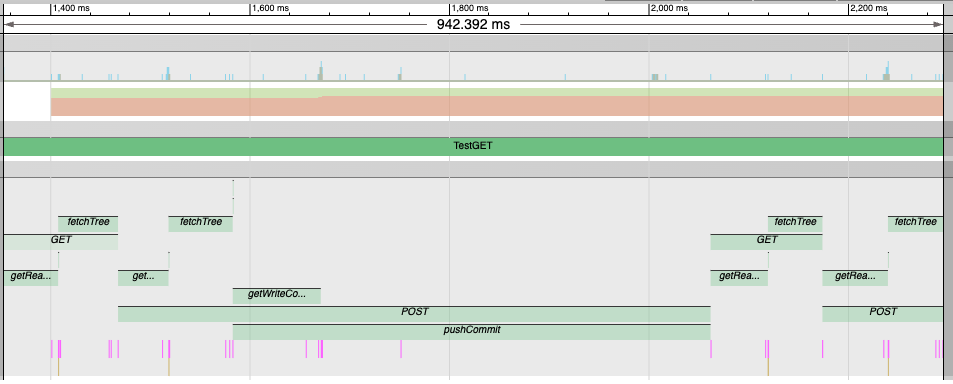
This brought the initial GET request down to 115ms! Even the POST was a little faster. Pretty encouraging progress.
Of course, it’s still not anywhere near production ready. There are still concurrency issues I alluded to next time, and I’ve not done any kind of extended test for stability. But it’s looking way more viable than the naïve implementation.
Next Steps
In part 3, I’m going to look at what happens when we have multiple “users” working with this API. Will I hit the kinds of concurrency issues I was expecting? Or maybe something entirely different?